
Assignment 2 : Architectural composition
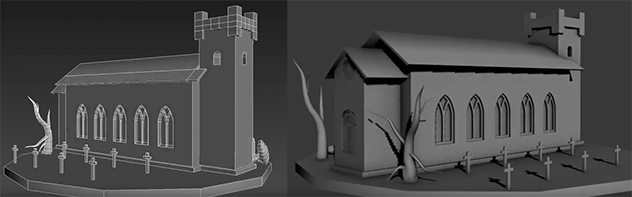
This is an example of Assignment 2: Architectural composition for 3d modeling class. Model an architectural scene / composition in 3Ds Studio Max, using techniques that we learned in class. Please use provided sketch.
Composition needs to include those elements:
1. Church as shown (sketch file)
2. Include Doors and Window as shown. (sketch file)
3. Add one tree or more.
4. Add few stones.
5. Add few tombstones.
6. Make this place look scary; Halloween / horror theme.
Be creative and create interesting composition; place elements together to create visually interesting design. Posting parameters: Create folder and name it ID_Name_ Assignment 2. In the folder save all picture references and 3Ds Studio Max file, name it: ID_Name_Assignment 2. Zip your folder and post it via our portal.
Have fun with your assignment, I am looking forward to seeing your assignment submission.
Sample of Assignment 2 : Architectural composition
3D’s Studio Max Gothic arch window: Class lecture recap
3Ds Studio max modeling round window
 Aneta V