Name Here
Game Design Document
Copyright notice / author information / legal stuff
Game Design
Summary/ overview
Game genre:
Target Audience:
Age and Gender:
Devices:
(Summary Example: X is in prison, he wants to get away from police but every time he tries to do that, they catch him. He discovers that only way to get away from police is to leave the country.)
기본정보
플랫폼(Pc,스마트폰…) 타겟유저(성별나이학력직업…), 목표심의등급 (나이), 게임장르
Story World-> Character->Conflict->Stakes
Sequence of events that unfolds in your game.
It may be linear and pre-scripted, or it may be branching and emergent. Like any storyteller, you should to choose aesthetics that help reinforce the ideas of your story, and technology that is best suited to the particular story that will come out of your game; game story, and its special relationship with game mechanics

스토리 시대배경 사건, 주인공, 주인공이 처한 입장. 무엇을 위해 무엇을 하는지를 설명하는 200자~300자 정도. 필요한만큼 쓸 것. 단 문단1에는 나머지를 포함하는 포괄적인 내용이 들어있어야 함. 게임에 따라 네러티브가 없어서 스토리가 없다면 생략 가능. 또한 스토리는 게임 전체의 분위기를 알려주며 음악이나 그래픽 풍을 연상하게 하는 효과가 있음을 명심.
Characters 게임 캐릭터주인공/ 유닛 (main character/unit)
- 주인공 혹은 유저가 주로 조작하게 되는 것들, 감정이입의 대상이 되는 것, 혹은 중요한 자원. 혹은 의사결정의 주체나 도구, 기술행위의 주체나 객체에 대한 건을 1,3~5개를 예시로 설명. 예외적으로 첫항목은 지금처럼 3줄정도를 할애해서 주인공에 대한 시나리오를 조금 써도 좋다.
적 (enemy)
- 주인공이 상대해야하거나 유저의 목표달성을 방해하는 장애요소를 적시하여 3개정도 설명.
자원 (Sidekick) Support Character
- 자원. 혹은 <친구들> 주인공이 적과 싸움에 있어 게임에 중요하게 작용하는 다른 것들.
Non-combat and Friendly Characters
Gameplay
유저입장에서 무엇을 해야하고, 어떤 컨텐츠를 어떻게 즐겨야 하는지를 명시.
게임에서 승리하기 위해 무엇을 해야하는지 설명. 게임 목표.
필요하다면 유저의 조작행위에 대한 설명.
지금처럼 4줄 정도로 간략하게.
Example: The goal of the game is freedom. Obstacles are cops, humans, vehicles, buildings, pits and animals.
Mindset 게임 분위기
기획에서 의도한 표준 모델 고객. 유저를 한정짓는 의미가 아님. 게임에 가장 잘 어울리는 타겟층.
그들이 어떤 자세로 게임에 임해야 하는지. 긴장감? 스릴? 아슬함? 도전 정신? 편안하게?
다양하게? 어떤 즐거움을 느끼면서? 어떤 즐거움을 느끼면서? 어떤 위대한 임무를 위해?
(Example: Player is aggressive, powerful, nervous and hurried. We provoke all these emotions with the help of obstacles and cops.)
Technical
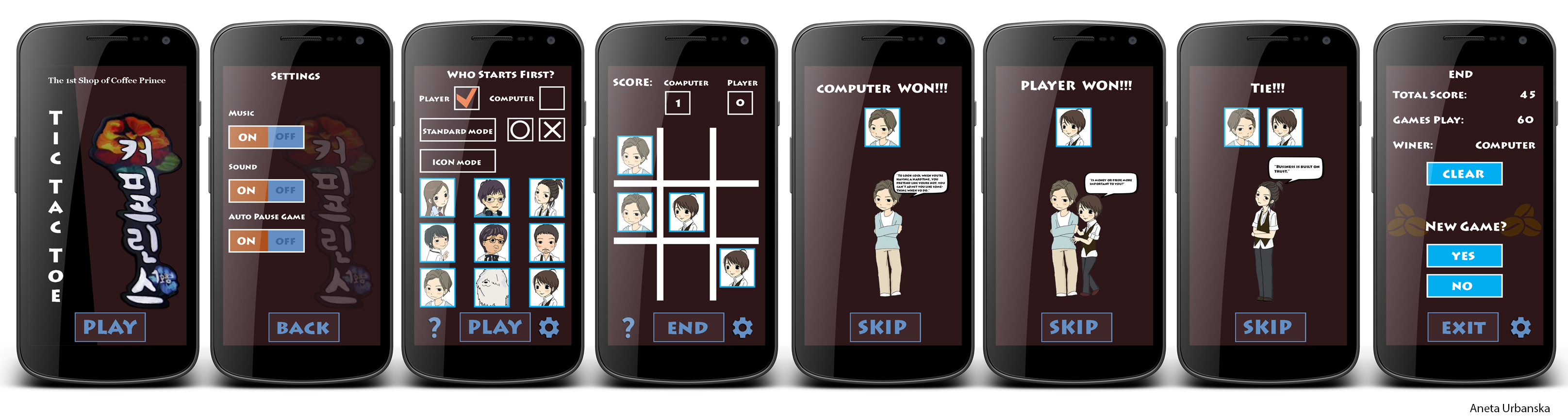
Screens (플레이 화면)
(Example
- Title Screen
– Catch me if you can, Start Game, How to Play,
- Map Select
- Game
- Inventory
- Assessment / Next Level
- End Credits
)

뭐 이런 정도의 느낌으로 해도 되고.
화면 구성요소별 설명 1
이게 여기 왜 있으며 어떤 기능을 가지고 있고 어떻게 되는지 설명.
화면 구성요소별 설명 2
이게 여기 왜 있으며 어떤 기능을 가지고 있고 어떻게 되는지 설명.
(스크린 구성도)
스크린 구성도를 넣는 이유도 여전히 <게임이 어떤 건지 알리기 위한 방법>일 뿐이지, 제작용이 아니라는 것을 명심해서 쓸데없는 디테일을 넣지는 말자. 이 스크린 구성도는 게임을 설명하는데 필요하니까 넣는 것이다.
Example:
스크린별 설명1 <스크린 이름>
이게 하는 일은 뭐고 어떤게 들어가고 어떻게 되는지, 버튼이 뭐뭐가 있는지.(버튼이 중요한게 아니라 여기서 어디로 연결되는지. 그 연결의 조작이 보통 버튼이니까.구성을 모두 설명할 필요도 없다. 가령 페이스북 같은 것은 ‘소셜 버튼들’이라고만 해두면 되니까.
스크린별 설명 2 <스크린 이름>
별다른게 없으면 대충 넘어가도 된다. 가령 회사로고 같은거. 이런건 구성도에 나와있으니 생략. 로딩화면이나 타이틀도 마찬가지. 일부러 로딩화면을 구성도에 넣을 필요 없다.
Controls
Controls will be direction buttons (forward, backward), action buttons (Jump and Fire).
컨트롤은 방향 버튼 (앞으로, 뒤로), 액션 버튼 (점프 및 화재)입니다.
Game Mechanics
Game mechanics are constructs of rules or methods designed for interaction with the game state, thus providing gameplay. Take to consideration physics, algorithms, AI, etc.
게임 메카닉은 즐거운 게임플레이를 연출하기 위한 목표(Goal)와 규칙(Rule) 그리고 빠른 피드백 주기(Feedback loops)의 구조를 가지며, 이는 게임이 아닌것을 게임화를 적용하고 결합할 수 있는 구성 요소이다.
Rock, Paper, Scissors
- Rock breaks scissors
- Scissors cut paper
- Paper covers rock
Game Rule 게임 규칙
게임규칙은 게임조작(컨트롤) 혹은 UI설계와는 다르다. 이 게임을 종이를 오리고, 물건을 가져다놓고 책상 위에서 종이 위에 숫자를 지우고 새로 적거나 바둑돌을 놔가며 수동으로 플레이한다고 상상해보자. 그때 사용되는게 게임 규칙이고, 모바일이나 컴퓨터에 프로그래밍 됐을 때 게임규칙을 수행하기 위해 유저가 하는 행위가 게임 조작이고, 필요한 정보를 제공하고, 조작을 받을 버튼을 배치하는 것이 UI 작업이다.
잘 모르겠으면 인터넷에 있는 보드게임 매뉴얼을 찾아보고, 못 찾겠으면 거리에 있는 보드게임 까페에 가서 보드게임 매뉴얼을 보자.
Artificial Intelligence
- Opponent and Enemy AI – The active opponent that plays against the game player and therefore requires strategic decision making.
- Non-combat and Friendly Characters.
- Support AI — Player and Collision Detection, Pathfinding.
Level Design
Levels. Each level should include a synopsis, the required introductory material (and how it is provided), the objectives, and the details of what happens in the level. Depending on the game, this may include the physical description of the map, the critical path that the player needs to take, and what encounters are important or incidental.
Example: Level1. Forest
- Mood: Dark, calm, foreboding
- Objects:
- Ambient: Fireflies, Beams of moonlight, Tall grass, Dark Tall Trees
- Interactive: Wolves, Goblins, Rocks
Level2. Castle
- Mood: Dangerous, tense, active
- Objects:
- Ambient: Rodents, Torches, Suits of armor
- Interactive: Guards, Giant rats, Chests
Game Flow
게임 흐름을 단계별로 그냥 설명해도 된다. 슈퍼마리오 같은 아케이드 게임인 경우 게임 흐름이 매우 편한데, 그렇지 않은 게임도 있을 것이다. 그럴 땐 이 게임이 ‘한 판’이 어떤 단계로 구성되는지를 설명할 것. 그런데 게임에 따라선 한판이 없을 때도 있는데, 그럴 때는 유저가 이 게임을 실행시켜 가장 작은 단위로 플레이하고 플레이를 끝내는 단위를 설정한다.
Example:
- Player starts in forest
- Pond to the left, must move right
- To the right is a hill, player jumps to traverse it (“jump” taught)
- Player encounters castle – door’s shut and locked
- There’s a window within jump height, and a rock on the ground
- Player picks up rock and throws at glass (“throw” taught)
- … etc.
Development
Abstract Classes / Components
(Example
- BasePhysics
-
- BasePlayer
- BaseEnemy
- BaseObject
- BaseObstacle
- BaseInteractable
)
Derived Classes / Component Compositions
(Example
- BasePlayer
-
- PlayerMain
- PlayerUnlockable
- BaseEnemy
- EnemyWolf
- EnemyGoblin
- EnemyGuard (may drop key)
- BaseObject
- ObjectRock (pick-up-able, throwable)
- ObjectChest (pick-up-able, throwable, spits gold coins with key)
- ObjectGoldCoin (cha-ching!)
- ObjectKey (pick-up-able, throwable)
- BaseObstacle
- ObstacleWindow (destroyed with rock)
- ObstacleWall
- ObstacleGate (watches to see if certain buttons are pressed)
- BaseInteractable
- InteractableButton
)
Graphics
Style Attributes
What kinds of colors will you be using? Do you have a limited palette to work with? A post-processed HSV map/image? What kind of graphic style are you going for? Cartoony? Pixel-y? Cute? How, specifically? Solid, thick outlines with flat hues? Non-black outlines with limited tints/shades? Emphasize smooth curvatures over sharp angles? Describe a set of general rules depicting your style here.
Graphics Needed
기획자로서 이 게임의 아트에 대해서 쓸 수 있다. Pixel, Stick Game이나 Doodle game같은 그래픽도 있으니 Art라고 해서 너무 고상한 것만 생각하지는 말자. 기획자는 그래픽 디자이너가 아니므로, 또 이 문서를 읽는 사람도 그래픽 디자이너는 아닐테니 전문용어를 찾아서 쓸 필요는 없다. 어떤 분위기의 아트가 이루어질지 알려주자.
2D/3D
Attributes
테마
화풍
색감
채도
조명
UI와 UI연출
버튼이나 게이지, 점수, 폰트 등이 어떤 느낌인지. 또 그것들이 작동하는 느낌.
특수효과들
참고자료
유사한 화풍의 예술,영화,만화,TV프로,게임 장면, 일러스트 등을 첨부.
Etc…
(Example
- Characters
-
- Human-like
- Goblin (idle, walking, throwing)
- Guard (idle, walking, stabbing)
- Prisoner (walking, running)
-
- Other
)
Sounds/Music
Style Attributes
사운드와 음악은 기본적으로 그래픽과 비슷하다. 양이 적다면 Art와 Sound를 합쳐버리자.
‘Graphics & Sounds’정도로.
크게 Effect Sound와 BGM: Background Music으로 나뉜다. 챙챙 하는 칼소리나 철컥거리는 버튼 눌리는 소리가 이펙트 사운드이고, 딴따라단딴딴딴 하고 전투중에 계속 나오는 음악이 BGM이다.
Stylistically, what kind of sound effects are you looking for? Do you want to exaggerate actions with lengthy, cartoony sounds (e.g. Mario’s jump), or use just enough to let the player know something happened (e.g. mega man’s landing)? Going for realism? You can use the music style as a bit of a reference too.
Music Needed
Example:
- Slow-paced, nerve-racking “forest” track
- Exciting “castle” track
- Creepy, slow “dungeon” track
- Happy ending credits track
Sounds Needed
Example:
- Effects
- Soft Footsteps (dirt floor)
- Sharper Footsteps (stone floor)
- Soft Landing (low vertical velocity)
- Hard Landing (high vertical velocity)
- Glass Breaking
- Chest Opening
- Door Opening
- Feedback
- Relieved “Ahhhh!” (health)
- Shocked “Ooomph!” (attacked)
- Happy chime (extra life)
- Sad chime (died)
Schedule
이건 여러분이 할 필요가 없다. 그냥 존재 자체만 알아둘 것.
그래픽,사운드에서 수량이 산출됐고, 프로그램 기능과 기획컨텐츠량이 나왔다면
이제 로드맵 짜고, 마일스톤 정하고, 달성목표 인력 투입량 정해서 시간,인력,돈을 통해
이 게임이 어떤 규모의 게임인지 설명할 차례이다.
그리고 이걸 만들어서 얼마 벌지, 오픈 이후 로드맵과 기타등등도 붙기도 하지.
(물론 그런 경우는 8강 때 설명했듯 좀 다른 성격의 문서가 된다.
——————————————————
The Art of Game Design
A Book of Lenses
Jesse Schell
 Aneta V